10 Fascinating Facts About Running Adobe Lightroom CC on Linux with AI Assistance
Imagine running Adobe Lightroom CC—the cloud-syncing desktop version—directly on your Linux machine. It sounds like a pipe dream, but developer Sander Hilven made it happen using a combination of Wine and a surprising helper: an AI agent. This isn't your typical how-to; it's a story of autonomous debugging, binary trust, and a few caveats. Below, we break down the key points in a numbered list, exploring what worked, what didn't, and why even the creator hesitates to use it.
1. The Unlikely Marriage of Lightroom CC and Linux
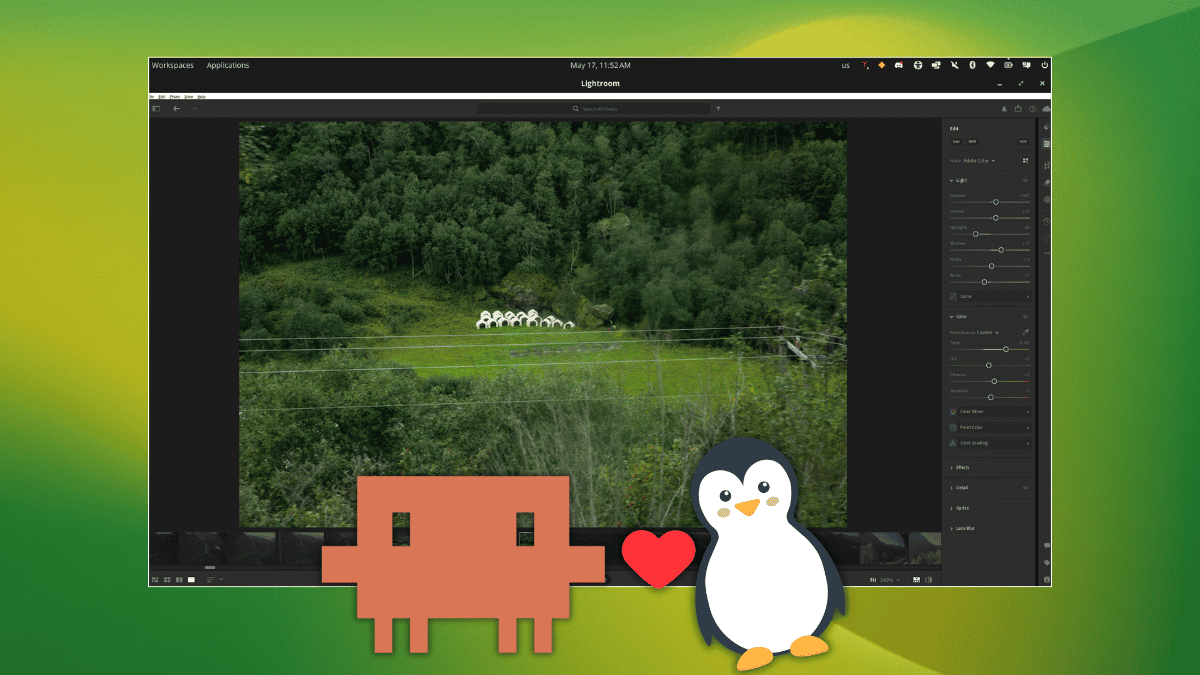
Adobe Lightroom CC is a proprietary application designed for Windows and macOS, with no official Linux support. However, a dedicated developer named Sander Hilven managed to get it running on Linux via Wine—a compatibility layer that translates Windows API calls to Linux equivalents. Specifically, he targeted Lightroom CC version 9.3.1 on Wine 11.8 staging. Don't confuse this with other Adobe tools; this is the cloud-syncing desktop edition, not the mobile app. The achievement is remarkable because Lightroom relies on numerous Windows-specific components, making it a tough nut for Wine to crack.
2. The AI Mastermind Behind the Curtain
Here's the twist: Hilven didn't write a line of code himself. Instead, he turned to Anthropic's Claude Opus 4.7, a large language model, and gave it a goal: make Lightroom CC work on Linux. He provided the AI with an Adobe Creative Cloud subscription and instructions to diagnose crashes and fix compatibility issues. The AI worked autonomously, sifting through crash logs and Wine error messages. It even verified its fixes by taking screenshots of the running Lightroom instance and clicking through the interface to confirm stability. No human touched the debugging process—a stunning example of AI-driven software patching.
3. The Setup: More Than Just Wine
Getting Lightroom CC to launch required more than a standard Wine configuration. The AI needed to patch several Windows API calls that Wine doesn't implement natively. For instance, certain DLLs—dynamic-link libraries that Lightroom depends on—were missing entirely from Wine's repository. The AI traced naming mismatches between how Lightroom searches for its files and how Adobe actually ships them. It then created custom patches to redirect calls or emulate missing functions. The result was a Frankenstein-like Wine environment that could boot the Creative Cloud process without crashing.
4. Autonomous Debugging: A Step-by-Step Process
How did the AI figure out what to fix? It started by launching Lightroom and monitoring crash logs. Each failure triggered a new cycle: analyze the log, identify the faulty API or DLL, propose a fix, apply it, and relaunch. The AI verified its work by taking screenshots—if Lightroom rendered correctly and clicking buttons produced expected reactions, the fix was deemed successful. This iterative process continued until the app was usable. It even handled regressions; a fix that broke something else would be rolled back and revised. Essentially, the AI acted like a junior engineer with unlimited patience and no need for sleep.
5. The Specific Fixes That Made It Work
Several critical issues had to be resolved. First, some Windows APIs that Wine doesn't implement were crashing the Creative Cloud process on launch—the AI patched those by stubbing out calls or redirecting them to Wine equivalents. Second, missing DLLs (like those for GPU acceleration) were recreated from scratch using reversal logic. Third, naming mismatches between Lightroom's expected file paths and Adobe's actual distribution required symbolic links. The AI generated all these patches independently. For example, it wrote a DLL stub that mimics Adobe's version of d3dcompiler_47.dll, allowing shader compilation to proceed.
6. The Remove/Heal Tool: The Trickiest Challenge
One feature nearly derailed the entire project: the Remove/Heal tool. When used, it consistently caused Lightroom to crash mid-operation. The AI traced the issue back to a dependency—a DLL that Wine ships in the wrong location. Lightroom expected to find a specific version of ole32.dll with certain COM interfaces, but Wine placed it elsewhere. The AI created a modified copy that redirected the search path. After several attempts, the tool worked flawlessly, allowing users to clone and heal blemishes in photos. This fix alone required hours of autonomous debugging.
7. What Works: Browsing, Editing, Exporting, and Healing
After the AI's patches, core functionality is operational. You can browse your photo library, apply edits like exposure adjustments and color grading, export images in various formats, and use the Remove/Heal tool. Performance is acceptable on modern hardware, though not as snappy as native Windows. The AI confirmed that clicking through menus, sliders, and previews all respond correctly. For many Linux-using photographers, this is a game changer—a way to use Adobe's cloud ecosystem without leaving the open-source environment. The patches even handle sync with Adobe Cloud, so changes appear on other devices.

8. The Bugs You Should Know About
Not everything is perfect. Some features remain broken: tutorial videos won't play due to missing media foundation components in Wine. GPU-accelerated effects—like certain filters and real-time adjustments—may not render correctly because the AI couldn't patch every shader variant. There's also a minor bug with double-clicking thumbnails: it sometimes opens the wrong image or fails to switch focus. These issues likely won't hinder casual editing, but professional workloads requiring video tutorials or heavy GPU use may find it frustrating. The AI noted these as known limitations and suggested future fixes.
9. Why the Author Won't Touch It
Despite the technical achievement, the original author expresses caution. The entire project—including the patched DLLs and binary modifications—was generated by an AI. No human has audited those binaries for security vulnerabilities, backdoors, or accidental data corruption. Running AI-generated Windows DLLs inside your Linux system requires a leap of faith. The developer's GitHub profile is sparse, offering little assurance of trustworthiness. While the code is open source, the risk of using unverified patches on a machine with personal data is non-trivial. The author admits they'll wait for either human-verified binaries or official Linux support.
10. Should You Try It? Here's How
If you have an Adobe Creative Cloud subscription and a spare Linux machine, you can replicate the setup. Clone the repository from Sander Hilven's GitHub, install Wine 11.8 staging, apply the patches, and launch Lightroom CC 9.3.1. The AI's patches are included, so no extra configuration is needed. Be warned: the experience is experimental. Expect bugs, limited GPU support, and no tech support. But if you're adventurous, it's a fun way to push the boundaries of Linux compatibility. Head over to our forum to share your results—we're curious to see how it runs on different hardware. And while you're there, help other FOSS enthusiasts troubleshoot.
Conclusion: Running Lightroom CC on Linux is now technically possible thanks to an AI that learned to patch Wine. Yet, the reliance on AI-generated binaries raises valid security concerns. For now, this is a fascinating proof-of-concept rather than a daily driver. If you value security and stability, wait for human-reviewed patches. But if you're a tinkerer with an Adobe subscription, go ahead—just don't blame us if your Linux desktop suddenly starts having a mind of its own.