10 Things You Need to Know About Ubuntu Pro in Security Center
Ubuntu's latest LTS release, version 26.04, introduces a streamlined approach to managing system security. The traditional Software & Updates utility has been phased out, with its Ubuntu Pro configuration integrated directly into the revamped Security Center app. This shift promises a simpler, more intuitive experience for users. Whether you're a personal user enjoying the free tier or an enterprise managing multiple installations, understanding the new setup is essential. Below are ten crucial aspects of enabling Ubuntu Pro through Security Center, covering everything from interface changes to subscription details.
1. The Move from Software & Updates
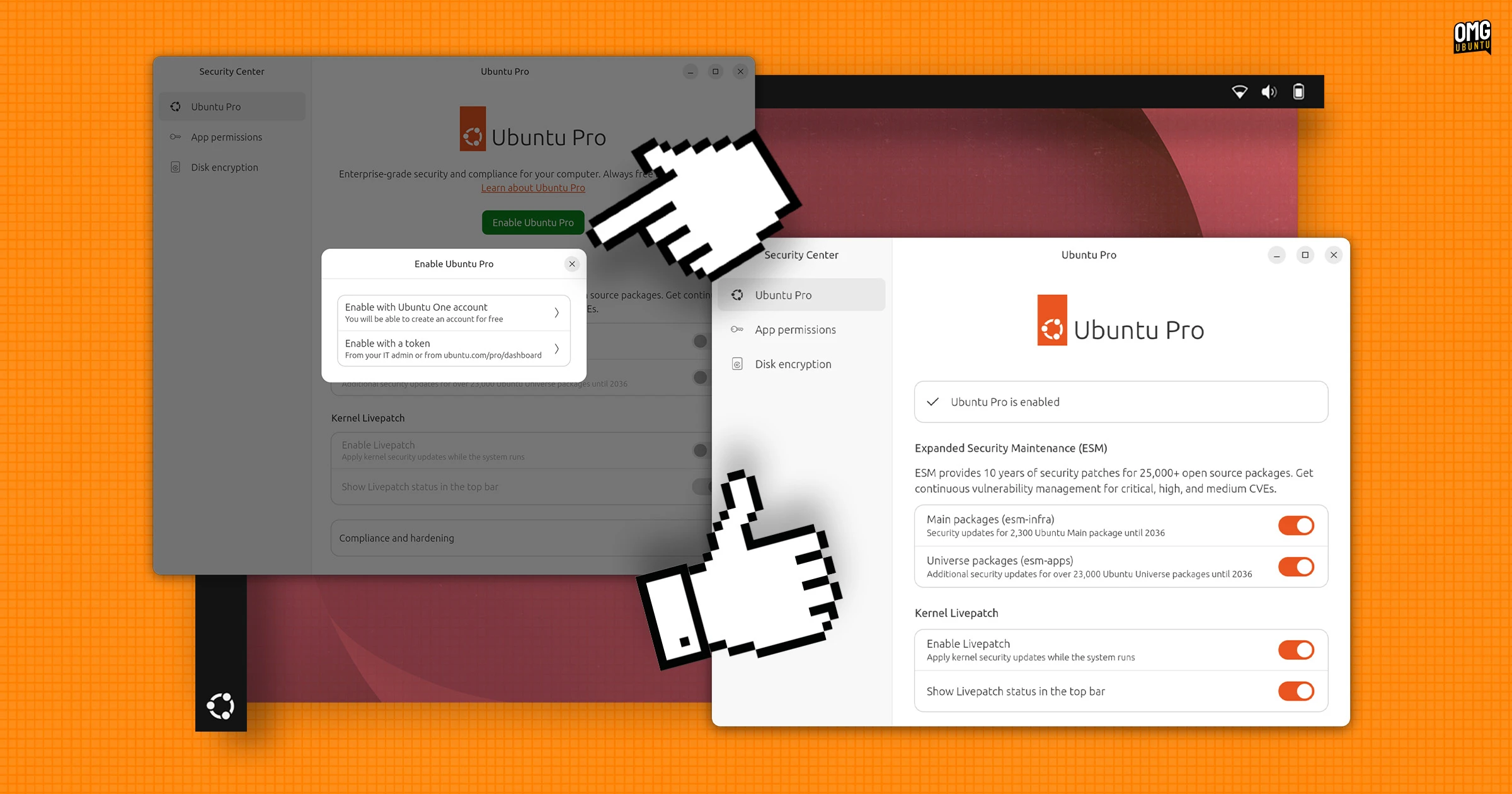
Ubuntu 26.04 LTS no longer includes the Software & Updates utility by default. Its Ubuntu Pro tab has been relocated to the Security Center application, which now serves as the central hub for security configurations. This consolidation reduces clutter and centralizes critical settings, making it easier for users to find and manage Pro features without navigating separate tools. The change reflects Ubuntu's focus on improving user experience and security management.

2. Enhanced Layout and Clarity
The new Security Center interface offers a less cramped layout compared to the old Software & Updates tab. Options and toggles are presented with more breathing room, and each setting includes a concise explanation of its function. This design improvement helps users understand the impact of enabling or disabling features, reducing guesswork and potential misconfiguration. The overall result is a cleaner, more user-friendly dashboard for managing Ubuntu Pro.
3. Identical Feature Set
Despite the interface changes, the range of options available in Security Center mirrors what was previously found under Software & Updates > Ubuntu Pro. Users will find the same toggles for services like livepatch, landscape, and security updates. This consistency ensures that existing workflows remain unaffected, while the new environment makes these options more accessible. No functionality has been removed—only repackaged for better usability.
4. Free for Personal Use
Ubuntu Pro remains free for personal use on up to five devices. This generous offering includes essential security patches, extended support, and access to a curated set of tools. Individual users can enroll their machines without any cost, provided they stay within the device limit. The free tier is ideal for home users, students, and hobbyists who want enterprise-grade security without a subscription fee.
5. Paid Subscription for Businesses
Organizations, enterprises, and anyone managing a fleet of Ubuntu installations require a paid subscription. This covers advanced management features, compliance tools, and support for a larger number of devices. The subscription model ensures that professional users receive priority updates, dedicated assistance, and integration with corporate infrastructure. Pricing scales based on the number of devices, offering flexibility for businesses of all sizes.
6. Simplified Enrollment Process
Enrolling devices in Ubuntu Pro has been significantly improved. The Security Center now guides users through a smoother sign-up flow, requiring fewer steps to activate the free tier or link a subscription account. The process automatically detects eligibility and provides clear feedback. This reduction in friction encourages more users to take advantage of Pro’s benefits, especially those new to Ubuntu.
7. Integration with Existing Security Tools
Ubuntu Pro settings in Security Center work seamlessly with other system security features, such as the firewall and automatic updates. Users can manage all aspects of protection from one place, reducing the need for multiple applications. This integration simplifies system administration and ensures that security policies are applied consistently across the OS.
8. Real-Time Monitoring and Alerts
The Security Center provides real-time status indicators for Ubuntu Pro services. Users can quickly see whether livepatch is active, if security updates are pending, or if a subscription is about to expire. This visibility allows proactive management and helps avoid lapses in protection. The alerts are non-intrusive but prominent enough to prompt action when needed.
9. Backward Compatibility and Migration
Users upgrading from previous LTS releases will find that their existing Ubuntu Pro configuration carries over seamlessly. The Security Center recognizes previous enrollments and settings, applying them without manual reconfiguration. This backward compatibility minimizes disruption during upgrades and ensures that security policies remain intact.
10. Overall Assessment and Future Outlook
Enabling Ubuntu Pro through the new Security Center is indeed easier—the interface is cleaner, explanations are clearer, and enrollment is faster. While the underlying functionality is unchanged, the improved user experience makes it more accessible to a wider audience. This update signals Ubuntu’s commitment to refining security management, and future iterations are likely to bring even tighter integration and additional features.
In conclusion, the transition of Ubuntu Pro settings into Security Center represents a thoughtful improvement. It retains all the powerful capabilities of the Pro service while making them easier to configure and monitor. Whether you are a personal user or managing a fleet, the new setup is worth exploring to maximize your system's security. For a step-by-step guide, refer to the enrollment section above, and check the free tier details if you haven't already.